About Inbox
Inbox is an online inbox in MyFax Central where you can access your stored faxes that you've sent and received. From Inbox, you can view, forward, and resend your stored faxes. Inbox also offers an extensive set of tools to help manage your stored faxes. Since Inbox is online, you can access your faxes anytime, anywhere you have a connection to the internet.
From Inbox, you can:
- View received or sent faxes.
- Compose a new fax.
- Resend a fax.
- Forward a fax via e-mail.
- Search for faxes.
- Print a fax.
- Download a fax.
- Organize your faxes.
- Manage your contacts list.
The Inbox Interface
Inbox is divided into different panes, each with a specific purpose. Some panes also include a toolbar that provides access to additional Inbox tools. The image below shows the elements of the Inbox interface:
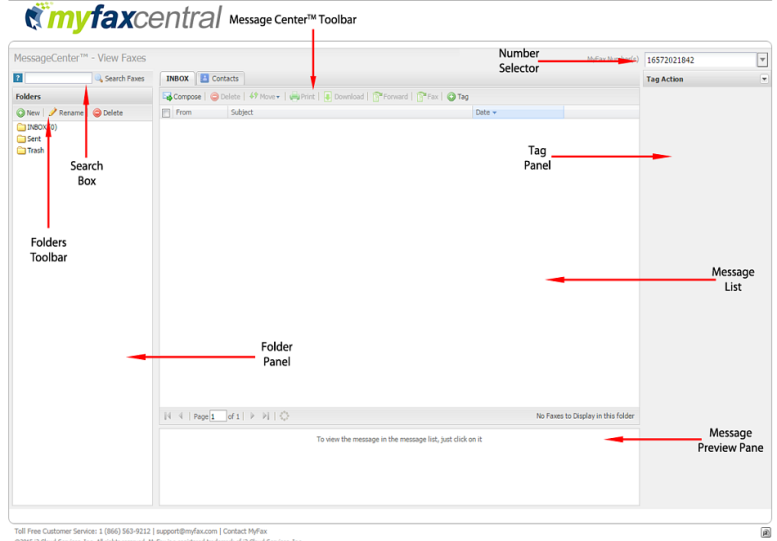
Here's a summary describing what each part of Inbox does:
| Folders Panel | Displays folders associated with your MyFax account |
|---|---|
| Folders Toolbar | Contains tools for managing your Inbox folders |
| Search Box | Lets you search your faxes |
| Inbox Toolbar | Contains tools for working with faxes. |
| MyFax Number Selector | Displays faxes from other fax numbers on your MyFax account |
| Message List | Displays messages in the folder selected in the Folders pane |
| Message Preview Pane | Displays the first page of the fax selected in the message list |
| Tag Panel | Lets you add or edit tags applied to a fax |